Transaction Processing: The All Or Nothing Principle in Databases
Transaction processing is built on one powerful concept: All Or Nothing. Understand how ACID transactions, MVCC, snapshot isolation, and VACUUM work together to protect your data integrity.
Transaction processing has been built upon a foundation of a simple yet powerful concept: All Or Nothing. Your application commits a series of database commands as one single unit of work. That unit succeeds in full, or it fails in full. What is being protected here? Your data integrity.
The Bank Transfer Example
Imagine a Bank Transfer, one of the most classic illustrations of why transactions exist.
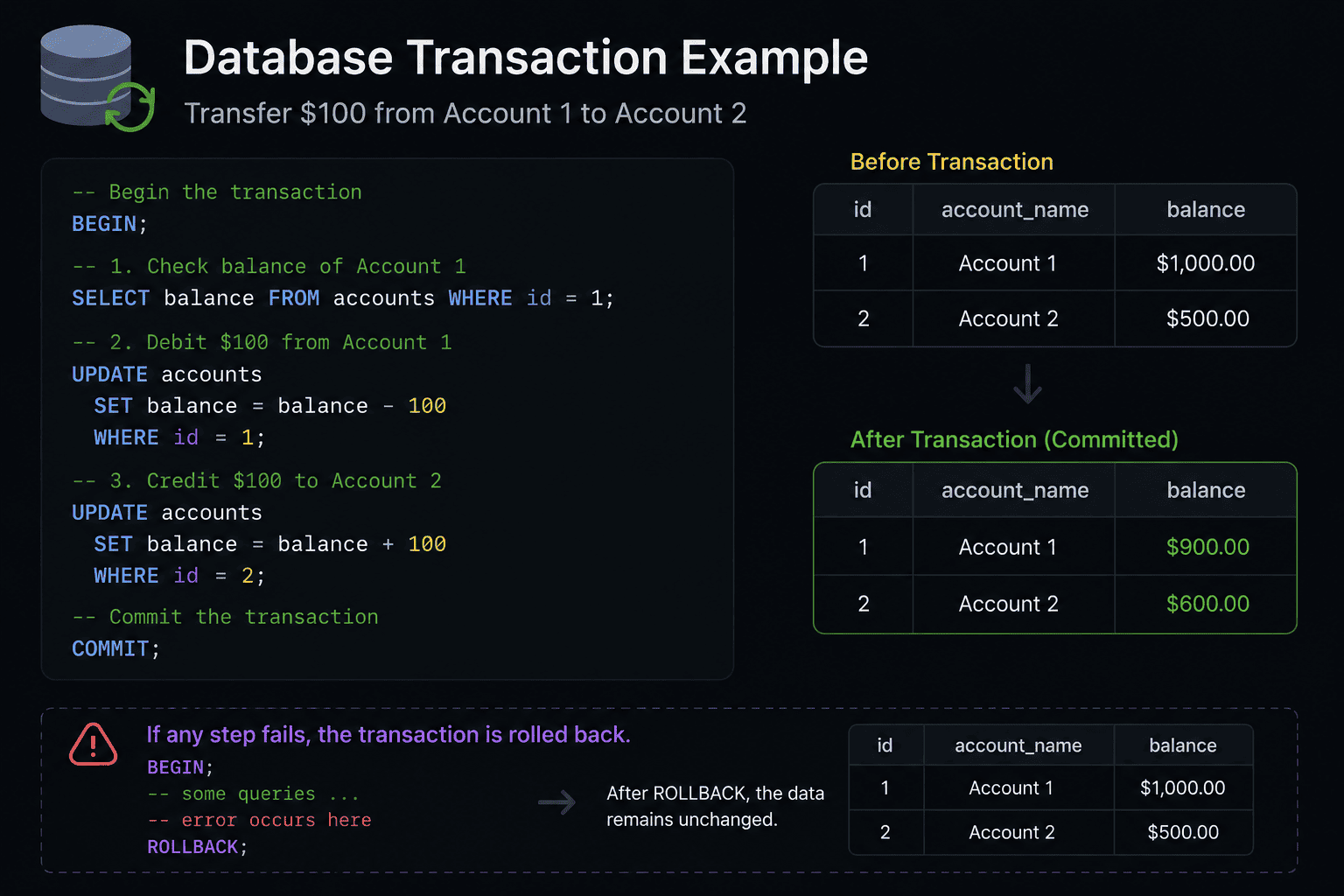
Account 1 needs to have $100 deducted from it. And Account 2 needs to receive $100. There are two different update processes involved here: the debit of Account 1, and the credit of Account 2.
- BEGIN: This tells the database to begin grouping your subsequent queries together as part of the same transaction.
- COMMIT: When both the debit and credit complete successfully,
COMMITtells the database to finalize the transaction, resulting in the money being transferred from Account 1 to Account 2 permanently. - ROLLBACK: If your system crashes or experiences an error while attempting to debit Account 1 prior to crediting Account 2,
ROLLBACKwill cause your database to roll back the partially completed transaction. Partially completed means that both accounts will still reflect their original balance, and the attempt to make the transfer will have failed altogether.
So what happens? Your database never finds itself in an incomplete, inconsistent state.
Beyond the Abstraction: Concurrency Control
Now let's move beyond this abstraction and get down to business. Once your application issues a BEGIN command, the database doesn't stop all other queries or lock the entire set of data. Because if it did, large-scale applications would come grinding to a halt.
What happens instead is that the storage engine creates a sophisticated metadata-tracking procedure so that your operations don't interfere with others.
With multi-version concurrency control (MVCC), used in storage engines such as PostgreSQL and MariaDB/MySQL's InnoDB, each transaction runs on its own "snapshot," or "read view" of the database. According to the MVCC golden rule:
Readers never block writers; writers never block readers.
How is this snapshot created?
MariaDB's InnoDB takes a lazy approach to evaluating its read views when a standard START TRANSACTION is issued. The snapshot isn't materialized into memory until the transaction has executed its very first read operation (for instance, a SELECT).
However, there is one exception to this rule. By using START TRANSACTION WITH CONSISTENT SNAPSHOT, you force the engine to create the read view at precisely the moment the transaction was initiated. This exactness is crucial to administrative tasks such as hot backups, which demand mathematical precision.
Deep Dive into Snapshot Isolation
To fully understand how databases maintain these snapshots without having to duplicate all of the rows in a table, we need to delve into some additional metadata that isn't immediately apparent.
PostgreSQL maintains snapshots through lists of active, top-level transaction IDs (XIDs) that exist throughout a cluster at any given time. For transaction visibility, PostgreSQL relies on hidden fields in the headers of every single row (or tuple), which are physically stored on disk.
There are four important hidden fields:
| Field | Description |
|---|---|
xmin (Creation ID) | Stores the transaction ID associated with inserting or updating this particular tuple version |
xmax (Deletion/Update ID) | Stores the transaction ID associated with deleting or replacing this tuple. Zero if the row hasn't changed |
cmin and cmax (Command IDs) | Determine whether this row is visible to the current transaction based on what commands it has executed |
hintbits | Cached flags stored directly on each row that eliminate unnecessary CLOG lookups during sequential scanning |
Each time a query retrieves a row from the disk, the storage engine must perform a complex bitwise visibility test. A row is only retrieved if:
- Its
xmincorresponds to a committed transaction that is visible in the current snapshot - Its
xmaxis either zero (the row has not changed) or corresponds to an uncommitted transaction
Physical Costs of Multi-Versioning
The architecture of MVCC dictates that PostgreSQL will never modify existing rows destructively on disk.
When executing an UPDATE command, PostgreSQL creates an entirely new version of the row on disk and assigns xmin of the new version to match the transaction ID currently in effect. Then it sets xmax of the previous row to match the current transaction ID. Thus, several versions of the same logical row reside side-by-side on disk simultaneously.
While this allows for the prevention of running out of memory due to excessive memory usage, it presents a significant physical challenge: Table Bloat.
Dead tuples, internally referred to as superseded, obsolete versions, become completely inaccessible to new transactions but consume valuable disk space that cannot be reused by new data until a background maintenance program known as the VACUUM daemon examines each table and identifies which versions can be reclaimed.
The Golden Rule of Transaction Scope
A well-established tenet among database engineers is that transactions should always be made as short-lived as feasible.
As soon as one long-running transaction occurs, it keeps alive the snapshot maintained by the storage engine. This in turn requires that all tables retain old versions of rows simply to honor visibility requirements for that lone long-running transaction.
As a direct consequence of this behavior, VACUUM will be paralyzed and unable to reclaim dead tuples cluster-wide, leading to:
- Extreme amounts of table bloat
- Increased disk I/O overhead per row
- Extreme row-level locking bottlenecks
Always treat heavy computational tasks involving APIs as separate from your database transaction boundary:
-- Good pattern: short, focused transactions
BEGIN;
  SELECT balance FROM accounts WHERE id = 1;
COMMIT;

-- Process data outside the database

BEGIN;
  UPDATE accounts SET balance = balance - 100 WHERE id = 1;
  UPDATE accounts SET balance = balance + 100 WHERE id = 2;
COMMIT;
Fetch your data. Close your transaction. Process your data outside of the database. Open another transaction only once you're ready to commit those changes back into the database.