The Ultimate Guide to AWS IAM & Organizations: From Basics to Advanced
Master AWS Identity and Access Management (IAM) and AWS Organizations from the ground up. Learn root user vs IAM user best practices, MFA, IAM policies, programmatic access keys, Service Control Policies (SCPs), and multi-account enterprise architecture.
Building in the cloud is not just about deploying servers and writing application code. Security is the foundation of everything you build in AWS. A single misconfigured permission, a compromised root account, or an overly permissive IAM policy can expose your entire cloud infrastructure to catastrophic breaches.
That is why AWS Identity and Access Management (IAM) and AWS Organizations are the most critical services in your cloud security stack. They are not optional add-ons. They are the last line of defense protecting every resource, every database, and every dollar in your AWS account.
Whether you are a solo developer launching your first EC2 instance or a senior cloud architect managing hundreds of accounts across an enterprise, mastering AWS access control is non-negotiable. In this guide, we will walk through AWS security from foundational IAM concepts to advanced multi-account organizational strategies used by Fortune 500 companies.
Basic Concepts: Understanding IAM and AWS Accounts
Before you can begin securing your AWS environment, you need to understand the core components of AWS access control.
IAM (Identity and Access Management) is a global, fully free AWS service that allows you to control two things:
- Authentication: Who can log in to your AWS account.
- Authorization: What permissions each authenticated user has to interact with your AWS resources.
Every AWS environment starts with two foundational elements:
- A 12-digit AWS Account ID that uniquely identifies your account.
- A root user, the original account owner created during sign-up.
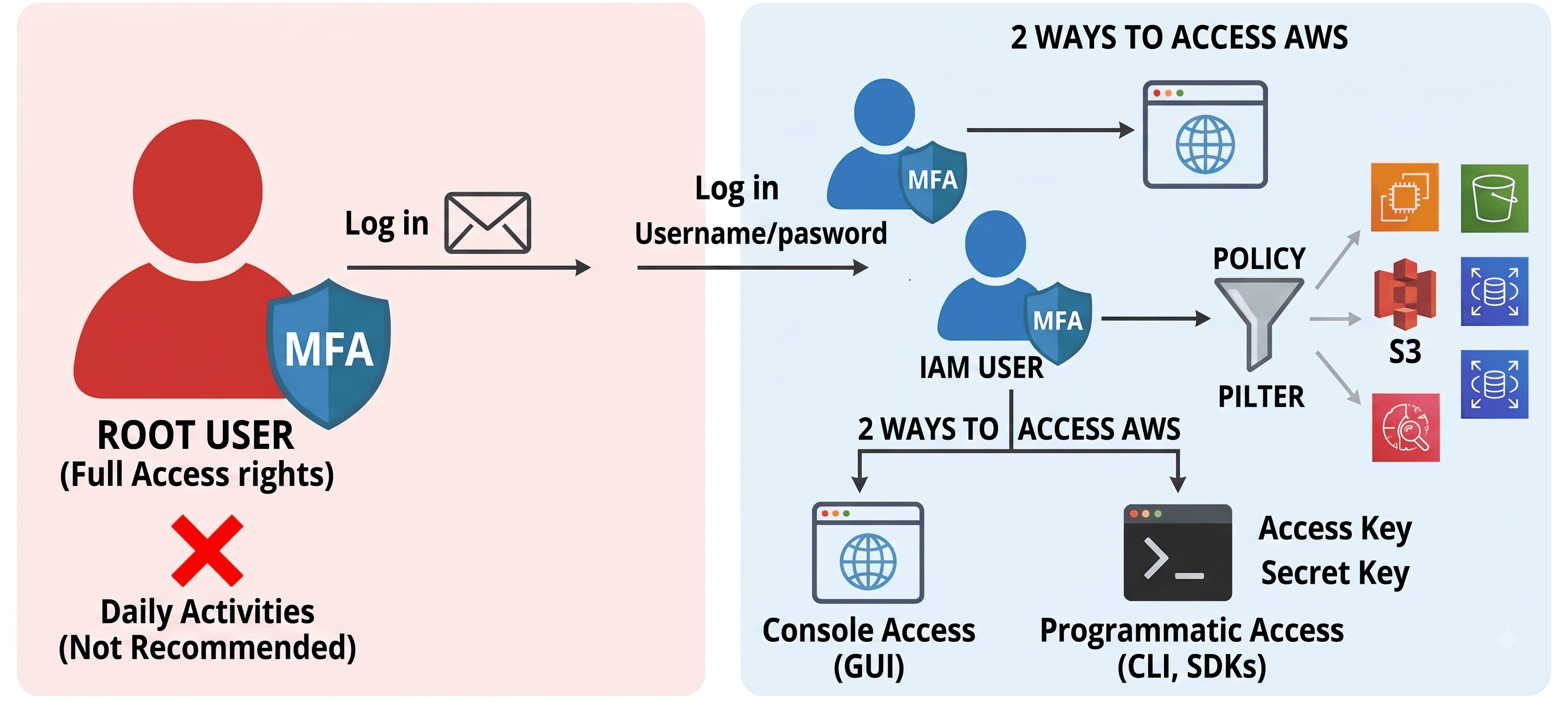
Root User vs. IAM User: The Most Important Distinction in AWS Security
The single most critical concept in AWS security is understanding the difference between the root user and an IAM user.
Root User
The root user is the account identity created when you first sign up for AWS. It is authenticated using the email address and password you used during registration.
The root user has complete, unrestricted access to every single resource in your AWS account, including:
- All compute, storage, and networking services
- Billing and cost management dashboards
- The ability to close the entire AWS account
Rule #1 of AWS Security: Never use your root account for day-to-day operations. Lock it away, enable MFA, and only use it for the rare tasks that explicitly require root-level privileges (such as changing your account billing settings or closing the account).
IAM User
Instead of sharing root credentials across your team, you create individual IAM user accounts. Each IAM user receives a unique username and password combination.
By default, a newly created IAM user has zero permissions. They cannot view, create, or modify any AWS resource until you explicitly grant them access through IAM policies.
This is the principle of least privilege in action: users start with nothing and receive only the specific permissions their role requires.
| Feature | Root User | IAM User |
|---|---|---|
| Login Method | Email + Password | Username + Password |
| Default Permissions | Full unrestricted access | Zero access (must be granted) |
| MFA Support | Yes (mandatory) | Yes (strongly recommended) |
| Should Be Used Daily? | No, lock it away | Yes, for all daily operations |
| Can Be Deleted? | No | Yes |
Multi-Factor Authentication (MFA)
Passwords alone are never sufficient for cloud security. AWS strongly recommends enabling Multi-Factor Authentication (MFA) on every account.
MFA adds a second layer of verification using a time-based one-time password (TOTP) generated by apps like Google Authenticator, Authy, or a hardware security key.
You must enable MFA for:
- Your root account (this is non-negotiable)
- Every IAM user with console access
- Any IAM user with elevated privileges
Even if an attacker compromises a password through phishing or credential stuffing, MFA prevents them from accessing the account without the physical authentication device.
Under the Hood: Access Methods and IAM Permissions
Once you have created your IAM users, the next step is defining how they access AWS and what actions they are authorized to perform.
Using IAM Policies to Manage Permissions
Access control in AWS IAM is entirely policy-driven. IAM policies are structured JSON documents that explicitly define the permissions granted or denied to an entity (user, group, or role).
When you attach policies to IAM entities, you can enforce extremely granular restrictions based on job function. Here are practical examples:
- Developer A may only launch EC2 instances and manage EFS storage
- Developer B may only manage S3 buckets and IAM roles
- Database Administrator may only access Amazon RDS
Here is what a real IAM policy looks like:
{
  "Version": "2012-10-17",
  "Statement": [
    {
      "Effect": "Allow",
      "Action": [
        "s3:GetObject",
        "s3:PutObject",
        "s3:ListBucket"
      ],
      "Resource": [
        "arn:aws:s3:::my-application-bucket",
        "arn:aws:s3:::my-application-bucket/*"
      ]
    }
  ]
}
This policy grants the attached IAM user permission to read, write, and list objects only within a specific S3 bucket called my-application-bucket. Any attempt to access other S3 buckets, EC2 instances, or any other AWS service would be denied by default.
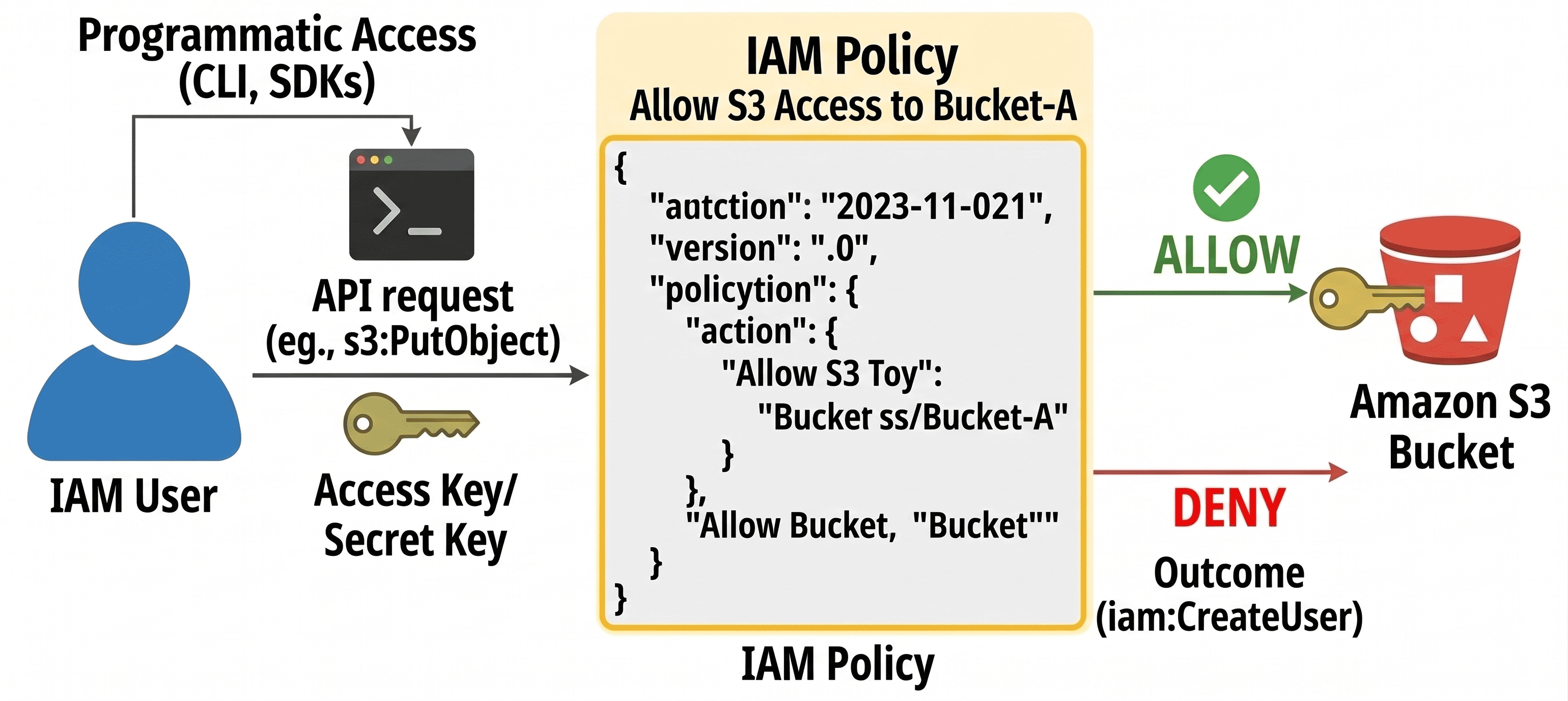
Key Components of an IAM Policy
Every IAM policy contains these essential elements:
| Component | Description | Example |
|---|---|---|
| Version | Policy language version | "2012-10-17" |
| Effect | Whether to allow or deny | "Allow" or "Deny" |
| Action | The AWS API actions permitted | "s3:GetObject", "ec2:RunInstances" |
| Resource | The specific AWS resources targeted | "arn:aws:s3:::my-bucket/*" |
| Condition | Optional restrictions (IP, time, MFA) | "aws:SourceIp": "203.0.113.0/24" |
Important: Explicit
Denystatements always overrideAllowstatements. If a user has one policy granting S3 access and another policy denying S3 access, the deny wins every time.
Two Ways to Access AWS
IAM users interact with AWS resources through two distinct access methods:
1. Console Access (GUI)
This is the web-based AWS Management Console, the visual interface where users navigate services, launch resources, and monitor dashboards. Users authenticate with their username, password, and MFA code.
The console is ideal for:
- Exploring AWS services visually
- Managing individual resources
- Monitoring CloudWatch dashboards and billing
2. Programmatic Access (CLI & SDKs)
Developers and automated systems do not browse graphical interfaces; they write code. Programmatic access enables users and applications to communicate with AWS through:
- AWS CLI (Command Line Interface): terminal commands like
aws s3 ls - AWS SDKs: language-specific libraries for Java, Python, .NET, Node.js, and more
- Infrastructure as Code tools: Terraform, CloudFormation, CDK
Programmatic access uses access key pairs instead of passwords:
- Access Key ID: a public identifier (similar to a username)
- Secret Access Key: a private credential (similar to a password)
You configure these credentials locally using:
aws configureThis command prompts you to enter your Access Key ID, Secret Access Key, default region, and output format.
Critical Rules for Access Keys
Access keys carry the exact same permissions as the IAM user's console login. Treat them with the same level of security as passwords:
- Your Secret Access Key is shown only once, at the moment of creation. If you lose it, you must generate a new key pair.
- Each IAM user can have a maximum of 2 active access key pairs at any time.
- Never embed access keys in source code or commit them to version control repositories.
- Rotate access keys regularly. Delete old keys and generate new ones periodically.
- Never create access keys for the root user. Use IAM users or IAM roles instead.
Advanced Usage: AWS Organizations and Enterprise Architecture
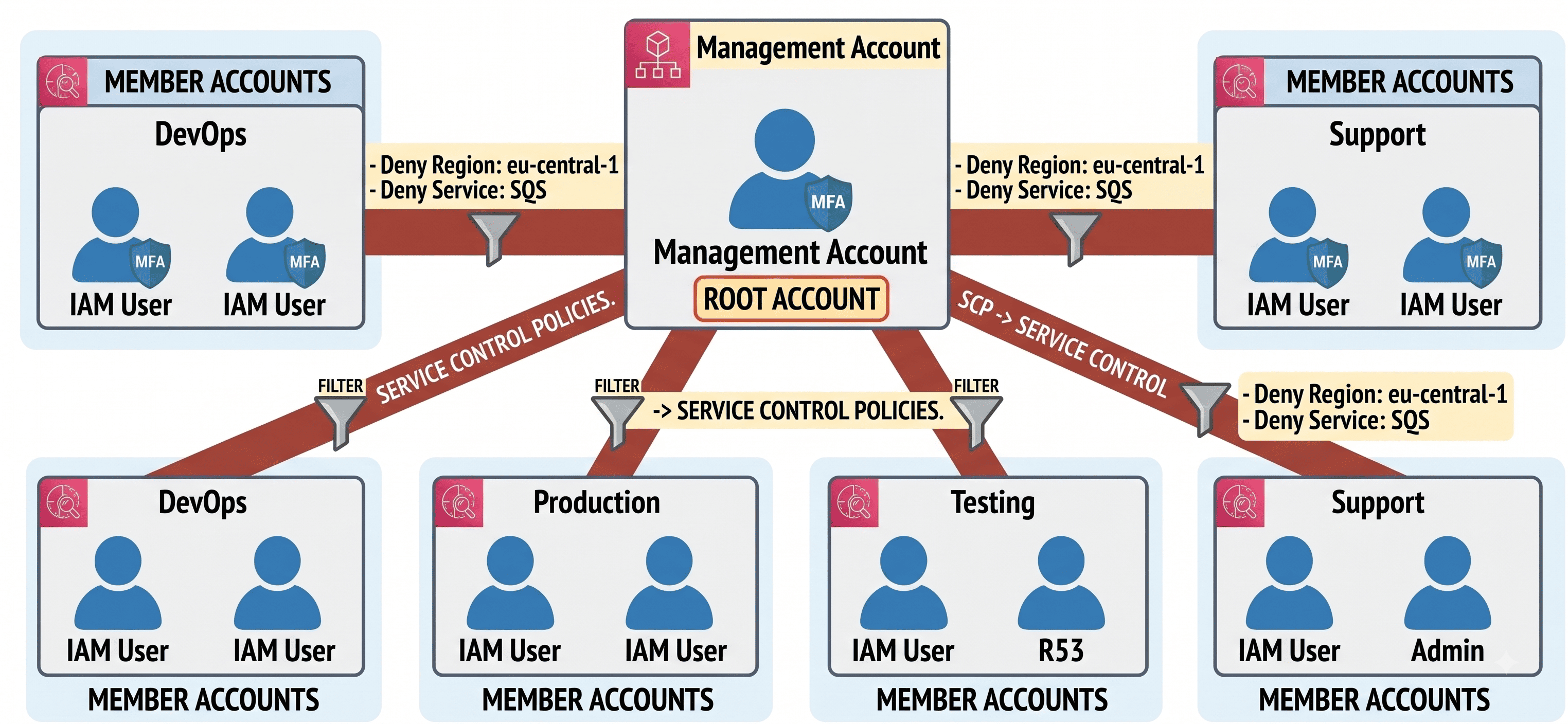
As organizations scale, managing a single AWS account with hundreds of IAM users becomes chaotic, insecure, and a compliance nightmare. Senior cloud architects solve this problem using AWS Organizations.
The Multi-Account Strategy
AWS Organizations provides a mechanism to centrally manage multiple AWS accounts from a single management hub. Instead of cramming all resources, teams, and environments into one account, enterprises segment their infrastructure into isolated, purpose-built accounts.
A typical enterprise multi-account structure looks like this:
| Account | Purpose | Example Teams |
|---|---|---|
| Management Account | Central billing, organizational governance, SCP management | Cloud Platform team |
| Production Account | Live customer-facing workloads | SRE, Backend Engineering |
| Development Account | Active development and feature branches | Software Engineers |
| Testing Account | QA, staging, integration testing | QA Engineers |
| DevOps Account | CI/CD pipelines, infrastructure automation | DevOps Engineers |
| Support Account | Customer support tools and dashboards | Support Engineers |
Why Multi-Account Architecture Matters
The isolation provided by separate accounts delivers three critical benefits:
-
Blast Radius Containment: If a developer accidentally deletes a database in the Testing account, production databases in the Production account remain completely unaffected.
-
Billing Separation: Each account receives its own cost allocation, making it trivial to track spending by team, environment, or project.
-
Compliance Boundaries: Regulated industries (healthcare, finance) can isolate workloads containing sensitive data into dedicated accounts with stricter controls.
Service Control Policies (SCPs): The Enterprise Guardrails
While IAM policies restrict individual user activity, Service Control Policies (SCPs) restrict entire AWS accounts. SCPs are applied at the organizational level and function as impenetrable security boundaries that override everything else.
Here is a critical distinction:
IAM Policies define what a user can do within their account. SCPs define what an account is allowed to do at all, regardless of individual IAM permissions.
For example, a management account could deploy an SCP on the Development account that:
- Prohibits resource creation outside of
us-east-1, ensuring all development workloads stay in a single region for cost and compliance purposes - Blocks usage of expensive services like Amazon Redshift or large EC2 instance types, even if a developer has full
AdministratorAccessvia IAM
Here is what a restrictive SCP looks like:
{
  "Version": "2012-10-17",
  "Statement": [
    {
      "Effect": "Deny",
      "Action": "*",
      "Resource": "*",
      "Condition": {
        "StringNotEquals": {
          "aws:RequestedRegion": "us-east-1"
        }
      }
    }
  ]
}
This SCP denies all actions in every AWS region except us-east-1. Even a user with full administrator privileges in the member account cannot create resources in eu-west-1 or ap-southeast-1.
Enterprise-Grade Auditing and Monitoring
Senior cloud architects deploy additional safeguards to maintain security and performance across multi-account architectures:
- AWS CloudTrail: records every API call across all accounts for audit trails
- AWS Config: continuously monitors resource configurations against compliance rules
- AWS Inspector: automated vulnerability scanning for EC2 instances and container images
- AWS Trusted Advisor: real-time best practice recommendations for security, performance, and cost
- Service Quotas: tracking and managing AWS service limits to prevent unexpected throttling
Conclusion: AWS IAM & Organizations Best Practices
Mastering AWS IAM and Organizations is a journey from creating individual users to designing enterprise-grade multi-account architectures. Regardless of your organization's size, follow these best practices to keep your cloud environment secure:
1. Lock Down Your Root Account
- Never use the root account for daily operations
- Enable MFA on the root account immediately after sign-up
- Never create programmatic access keys for the root user
- Use IAM users or IAM roles for all operational tasks
2. Enforce the Principle of Least Privilege
- Grant IAM users only the permissions required to perform their specific job functions
- Start with zero permissions and add access incrementally
- Regularly audit IAM policies and remove unused permissions
3. Rotate Credentials Regularly
- Rotate IAM user passwords on a defined schedule (e.g., every 90 days)
- Rotate programmatic access keys periodically
- Delete access keys that are no longer in use
- Use IAM Access Analyzer to identify unused credentials
4. Adopt Multi-Account Architecture Early
- Use AWS Organizations to separate workloads by environment and team
- Deploy Service Control Policies (SCPs) to enforce organization-wide security boundaries
- Implement consolidated billing for cost visibility across all accounts
5. Monitor and Audit Continuously
- Enable CloudTrail in every account to log all API activity
- Use AWS Config rules to enforce compliance standards
- Set up SNS alerts for suspicious IAM activity (root login, access key creation)
AWS security is not a one-time configuration. It is an ongoing discipline. The organizations that take IAM and multi-account architecture seriously are the ones that sleep well at night knowing their cloud infrastructure is protected.